Complete list
 How can you turn trading ideas into backtests using Agentic AI?
Build and test strategies faster with step-by-step AI powered workflows
“What if your trading ideas could turn into a backtest, while you focused only on generating ideas and evaluating results?”
In our previous Quantra Classroom, we explored how Agentic AI reduces the back-and-forth of repeated prompting. In this classroom, we take the next step and show how to build an agentic research workflow on Make.com so that you can automate the research process with a visual workflow and also have a minimal code setup.
Thus enabling you to:
Enter a trading idea → get a clear strategy hypothesis → generate a backtest-ready Python script
By the end, you’ll have a reusable workflow you can run anytime to test new ideas faster.
All concepts discussed in this classroom are covered in Quantra’s course “Agentic AI for Trading.” Click the View Course button to explore it further.

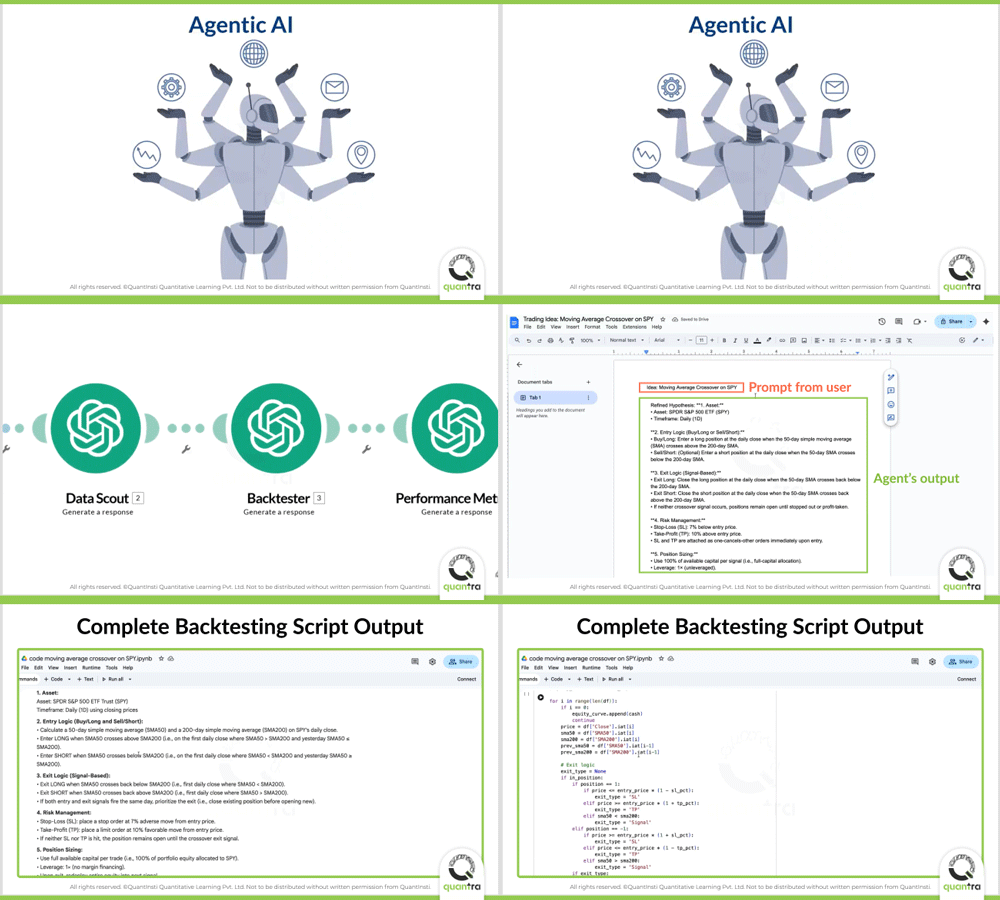
In this classroom, we’ll explore the following:
- A Quick Recap
- Designing the Workflow in Make.com
- Results and Observations
- What you can do next
A Quick Recap
In the previous Quantra Classroom, we designed our Agentic Quant Research Pipeline. Here’s a quick recap before we build it in Make.com.
To keep things simple, we had used the example of a basic moving average crossover strategy on SPY.
Start with a trading idea → refine it into a clear hypothesis → define rules and indicators → fetch historical data → run a backtest → evaluate results
For the above steps, we designed the workflow using five key agents:
- Hypothesis Designer: converts the idea into clear, testable rules
- Data Scout: fetches data and computes indicators
- Backtesting Agent: creates a backtest ready code
- Performance Agent: generates code for evaluating results and risk metrics
- Notebook Assembler: packages everything into a reusable Jupyter notebook
Next, we’ll build this exact workflow in Make.com, step by step.
Designing the Workflow in Make.com
Let’s convert our agentic quant research pipeline into a functioning agentic AI workflow using Make.com. The goal is simple - to get a complete backtest-ready python script for any raw trading idea the user inputs.
Step 1: Getting started with Make.com
Sign in to Make.com, go to the Scenarios section, and create a new scenario using the “+ Create scenario” button. Give it a clear name, such as Agentic AI Quant Team.
Step 2: Setting Scenario Input
Under the large “+” icon, there is a horizontal menu. Find the icon named “Scenario inputs and outputs”. Here choose an input style of your style for the workflow. Click Save.
Step 3: Adding your first agent (Hypothesis Designer)
On the scenario canvas, click the “+” icon to add your first module, search for OpenAI, and choose the Generate a response action. Set-up the OpenAI connection with your API key. You can now go ahead and select a suitable OpenAI model (in this classroom, we use o4-mini for its speed and reliability with structured instructions).
Next, you can add your strategy prompt type as text, this can be a simple text prompt or a saved prompt variable, depending on how you prefer to work.
You can then choose a runtime that suits your workflow by clicking on the clock icon on the agent.
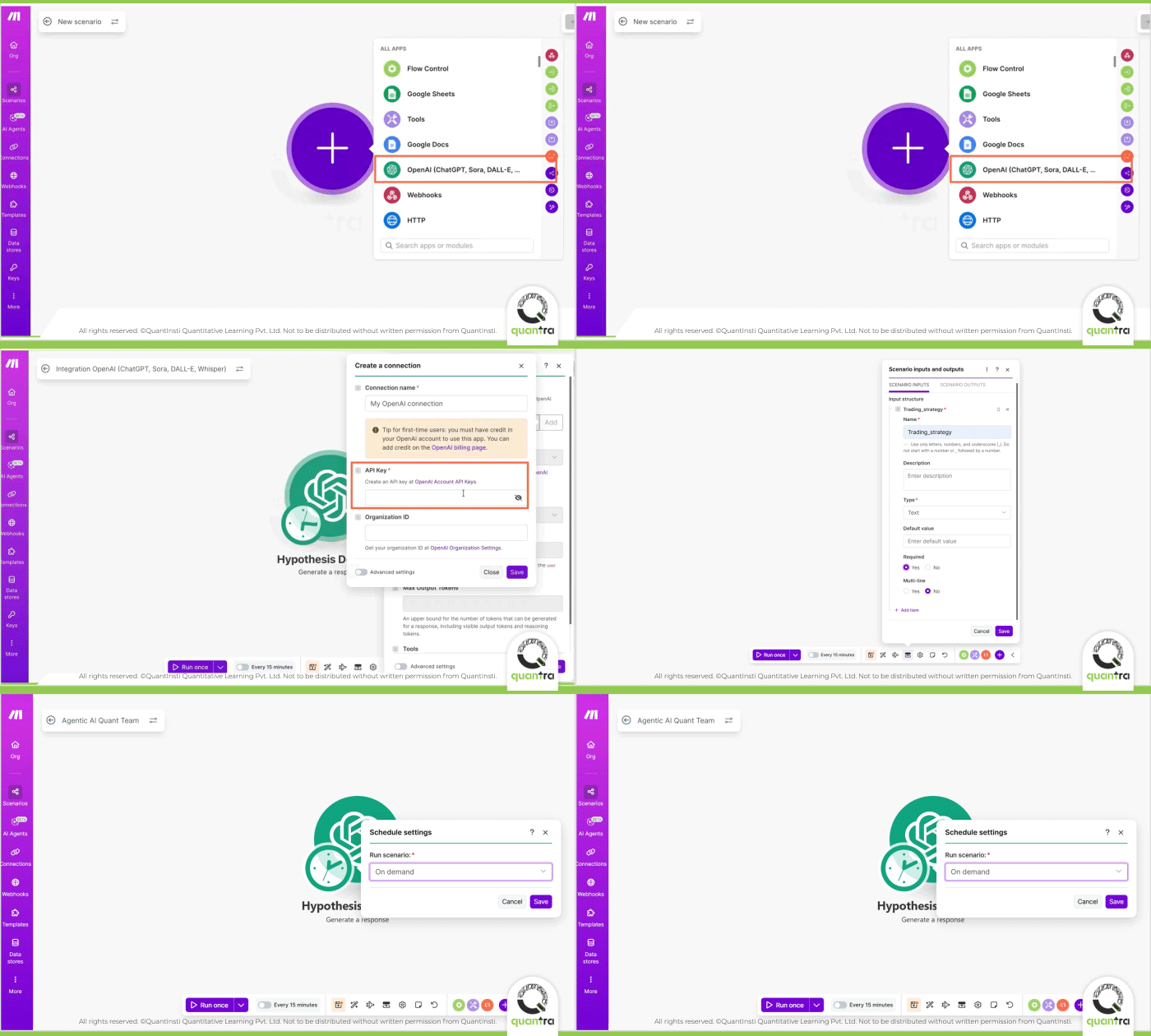
Tools and temperature settings can be adjusted based on your strategy and comfort level. However, fields marked with “*” are compulsory to mention.
Now, to set up the brain of the Agent, turn on Advanced options and use the Instruction section to clearly explain how the agent should handle broad or vague trading ideas. This is very important as this defines exactly how the agent should function. Since it is the first agent, instructions for this agent also affect the entire workflow ahead.
Finally, save the agent settings and save the scenario from the toolbar below. Your first agent, Hypothesis Designer is now ready !
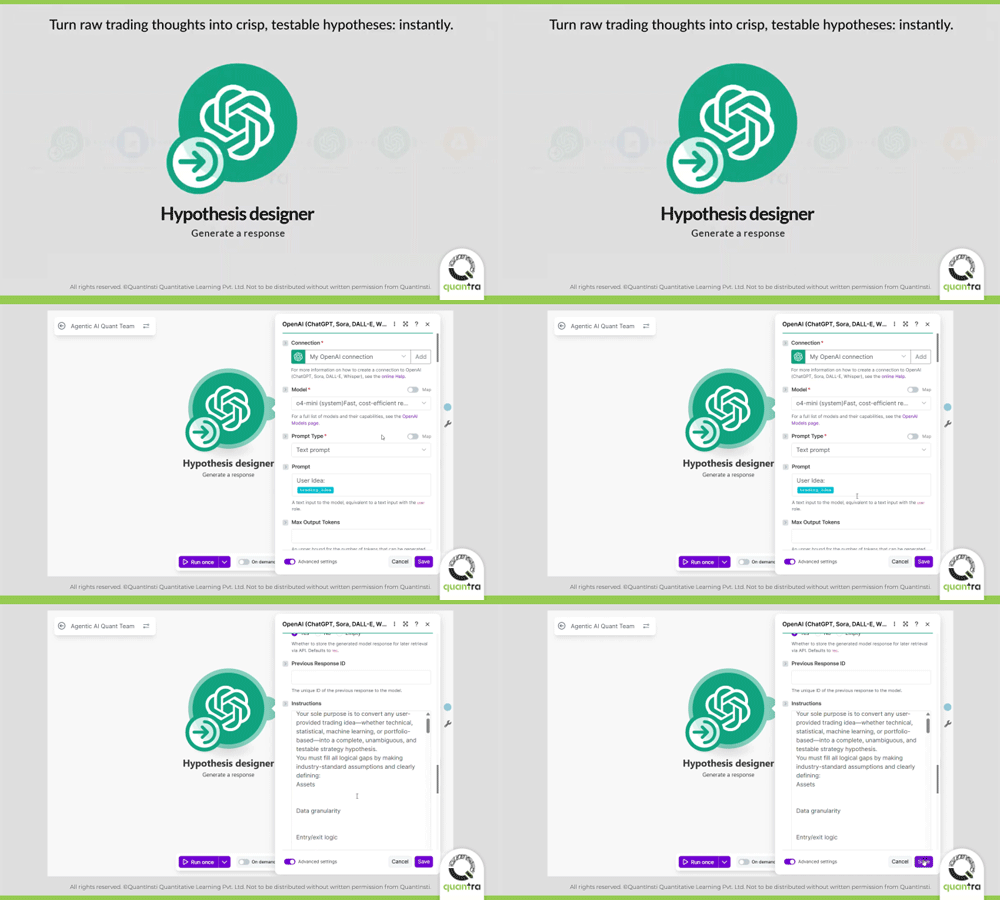
*If you’d like a detailed walkthrough on setting up the Agent 1 (Hypothesis Designer) refer to the Agentic AI in Trading course on Quantra.

Step 4: Saving the Hypothesis for Review (Save Refined Hypothesis)
Once the Hypothesis Designer creates the strategy hypothesis, we save it in a readable format by adding a Google Docs module so it can be reviewed before moving ahead.
We can do that by clicking on the “+” button after the first agent, then select the Google drive module and choose Create a new document.
Now you can connect your Google Drive account to the module, and can choose to map the strategy name so each idea is saved clearly and consistently.
Now select where the document should be stored in Drive, then save the module and the scenario.
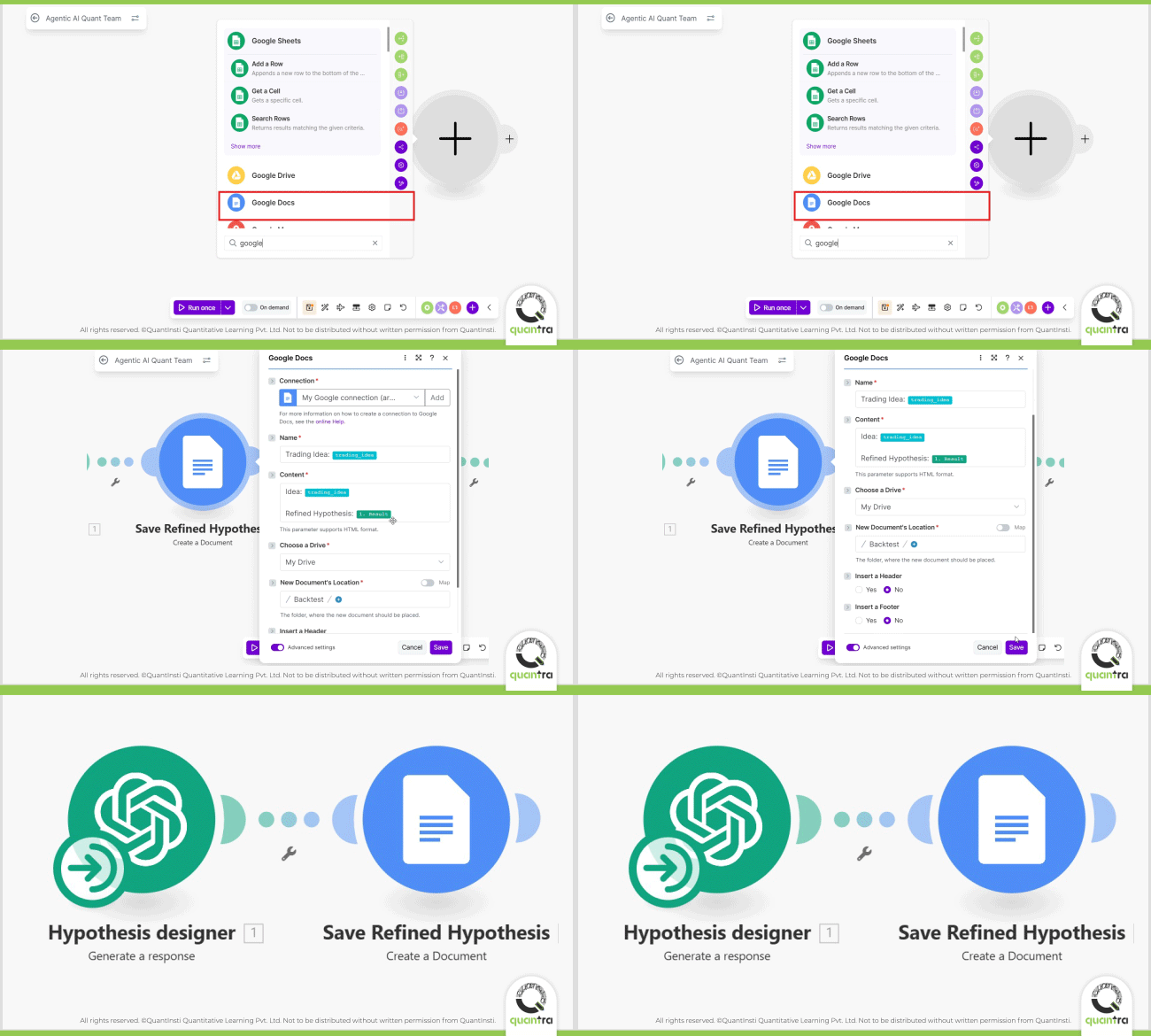
Once you run the scenario, a Google Doc is created in your Drive containing the refined strategy hypothesis and all assumptions made by the AI agent. This document now becomes the input for all the following agents in the workflow.
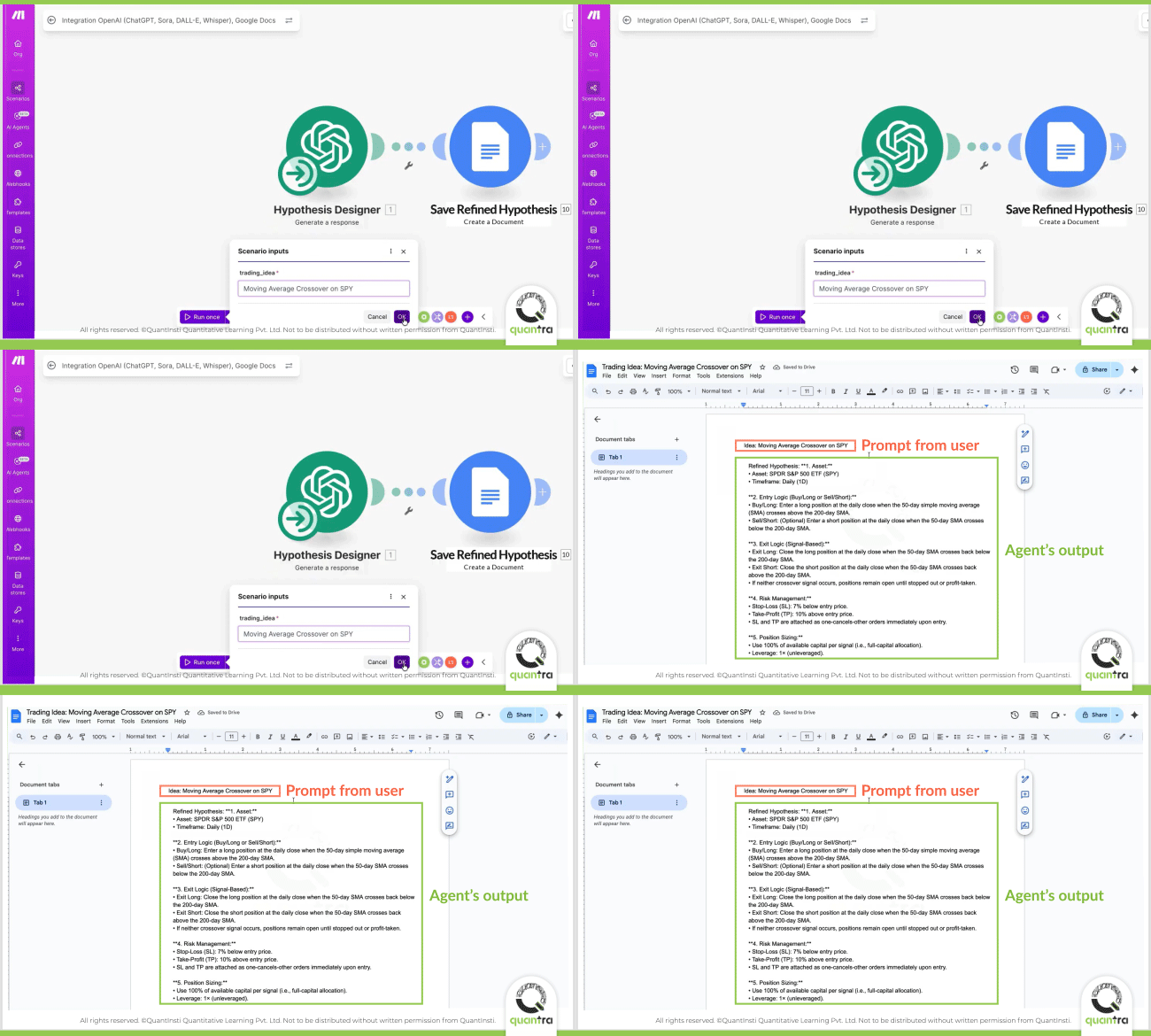
Once you’ve set up the first agent, you can build the remaining agents in a similar way based on your needs. To get the complete instructions used for Agent 1 in the workflow, click here.
You can try giving the system a simple trading idea, and see how Agentic AI turns it into something structured and usable.
For step-by-step guidance on creating all the agents covered here and more, explore Quantra’s Agentic AI in Trading course.

Results and Observations
So far, we’ve walked through how to set up the first two steps of the workflow. Refining a trading idea and saving it for review. Once the remaining agents are added and the scenario is run end-to-end, the real impact of this approach becomes clear.
The most striking outcome is how a loosely defined trading idea is turned into a fully backtestable strategy, along with ready-to-use Python code, with very little manual effort. There’s no need to stitch scripts together or rewrite logic at every step. The process is quick and requires no coding at the workflow level. Once the agents are set up, most of the work happens automatically in the background.
Final Thoughts: What You Can Do Next
In this classroom, you saw how an AI agent can be built using Make.com and how an agentic AI workflow for backtesting trading ideas can be built. The best part is that this workflow is not fixed. You can customise it based on your needs:
- Add new agents (for example, a risk management agent or a strategy validator)
- Change prompts to suit different trading styles
- Improve output formatting and reporting
- Swap models for better accuracy or speed
Note: Make.com workflows run in a linear sequence. There is no built-in feedback loop, so agents won’t automatically revise or correct themselves. This makes it important to review key outputs; especially the strategy rules, before trusting the final backtest.
Now it’s your turn !
Try feeding the workflow a simple trading idea, run it end-to-end, and see how quickly it turns into something testable. With practice, you’ll learn how small improvements in prompts, structure, and model choices can lead to much better results.
If you’re ready to go deeper and want hands-on guidance on creating the entire Agentic AI workflow for trading strategies, explore Quantra’s Agentic AI in Trading course and start turning your ideas into back-tested strategies.